The Inland Revenue Board of Malaysia (LHDN) is preparing to introduce changes to the tax agent appointment process, with the mandatory appointment of tax agents through the MyTax Portal taking effect from 1 January 2027.
In line with amendments to the relevant legislation, LHDN is developing the Tax Agent e-Filing System (TAeF) Version 3.0, which is expected to become available progressively from November 2026.
As part of this initiative, taxpayers will be required to appoint and authorize their tax agents electronically through MyTax to enable them to submit tax returns and perform tax-related transactions on their behalf.
These developments mark an important step in the digitalisation of Malaysia’s tax administration. Tax agents and taxpayers are encouraged to prepare early to facilitate a smoother transition to the new arrangements.
According to LHDN’s announcement, the key change is the mandatory appointment of tax agents through the MyTax Portal, effective 1 January 2027.
To support the implementation, LHDN is developing TAeF 3.0, which is expected to be made available progressively from November 2026.
In addition, taxpayers should take note of the following changes:
For businesses and individuals who engage tax agents to manage their tax compliance matters, the new requirement means that existing tax agent arrangements will need to be properly reflected and authorised through the MyTax Portal.
Taxpayers should take the necessary steps to ensure that their appointments are correctly recorded and that their appointed tax agents are authorised to act on their behalf.
In particular, taxpayers should:
Early preparation and communication with existing tax agents will help minimise potential disruptions to ongoing tax compliance matters during the transition.
To facilitate the transition, LHDN has provided guidance for companies and organisations on how to accept or reject existing tax agent appointment offers through MyTax.
Taxpayers may follow the steps below:
Step 1: Login to MyTax (https://mytax.hasil.gov.my/)
Log in to the MyTax Portal and switch your user role from “individual” to either “Company Director” or “Organisation Administrator”, as applicable.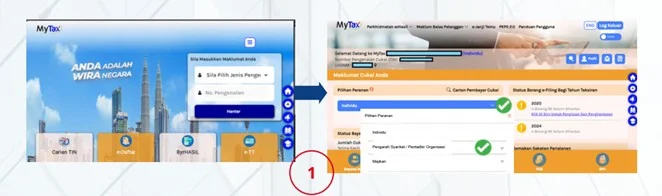
Step 2: Click Profile
Select the “Tax Agent Appointment” tab.
Step 3: Review the Appointment Invitation
Under the “Tax Agent Appointment” tab, scroll down to the list of tax agents and click the relevant action button corresponding to the appointment invitation received.
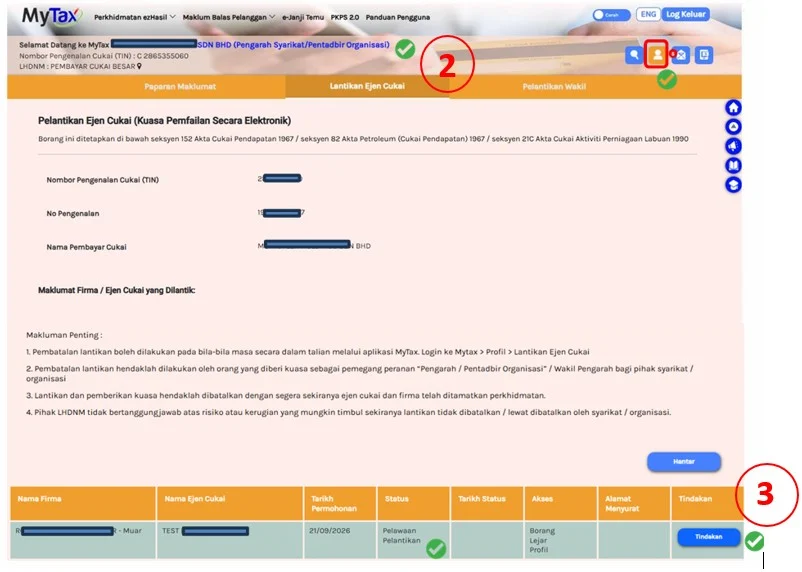
Step 4: Verify the Tax Agent’s Details
Review the details of the tax agent firm and the individual tax agent proposed for appointment. Ensure that the information is accurate and corresponds to the tax agent currently providing services to your company or organisation.
Step 5: Review the Appointment Terms and Conditions
Read and understand the terms and conditions relating to the appointment and authorisation for electronic filing before proceeding.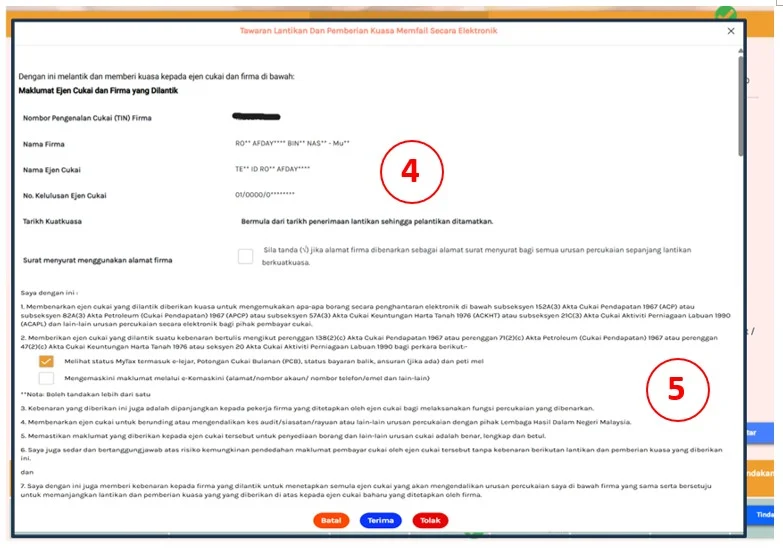
Step 6: Accept or Reject the Appointment
After reviewing the details and terms, select the appropriate option:
Taxpayers should ensure that the correct tax agent has been selected before confirming their decision.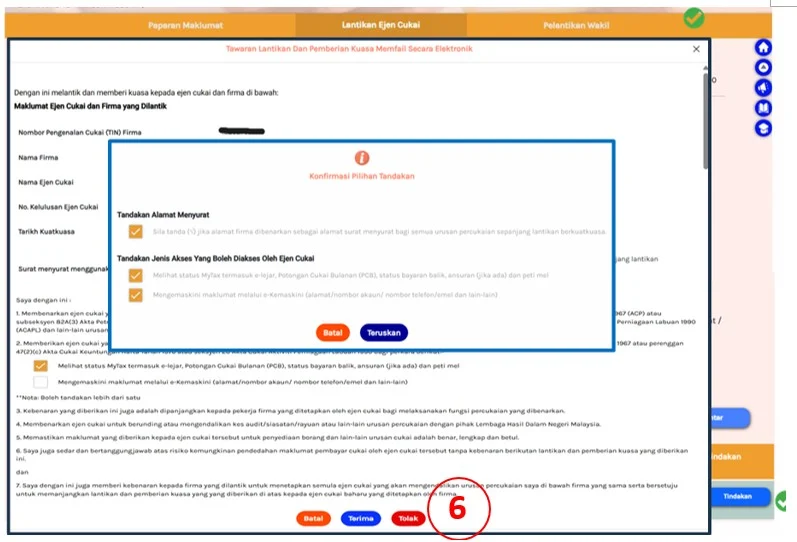
With the implementation of TAeF 3.0 and the mandatory online tax agent appointment process approaching, businesses should take proactive steps to ensure their tax agent arrangements are in order.
Companies are encouraged to coordinate with their existing tax agents, review the appointment invitations issued through MyTax and ensure that the relevant authorised representatives are able to access the portal.
Businesses should also verify their tax agent appointment details and ensure that the necessary authorisation is completed within the stipulated timeframe.
Early preparation will help businesses and their appointed tax agents navigate the transition more efficiently and minimise potential interruptions to their tax compliance activities.
For further information, taxpayers may refer to the official guidance issued by LHDN on the acceptance and rejection of tax agent appointment offers through MyTax.